Recover repeat orders with Buy Again emails and QR reorder links
Remind opted-in customers when products run out, rebuild the same cart in one click, and optionally apply a reorder discount. Track recovered revenue, QR clicks, and activity in one place.
- No theme code required
- Consent-safe sends
- Exact cart links
- Revenue attribution
Example product data
From paid order to attributed reorder
Paid order
A consented customer buys a replenishable product.
Reminder scheduled
Queued with exact variant, quantity, and timing.
Buy Again click
One-click cart link rebuilds the original order.
Reorder attributed
Matching reorder shows as recovered revenue.
See recovered revenue, not vanity metrics
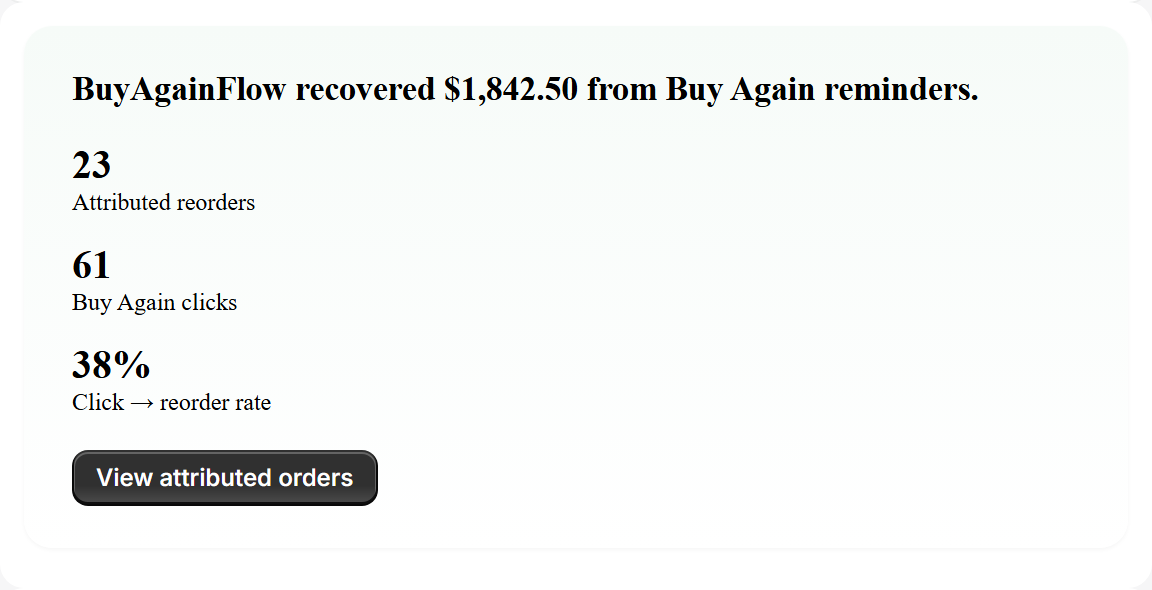
BuyAgainFlow attributes revenue only after a customer clicks Buy Again and completes a matching reorder.
- Recovered revenue with a clear attribution window
- Buy Again clicks and click → reorder rate
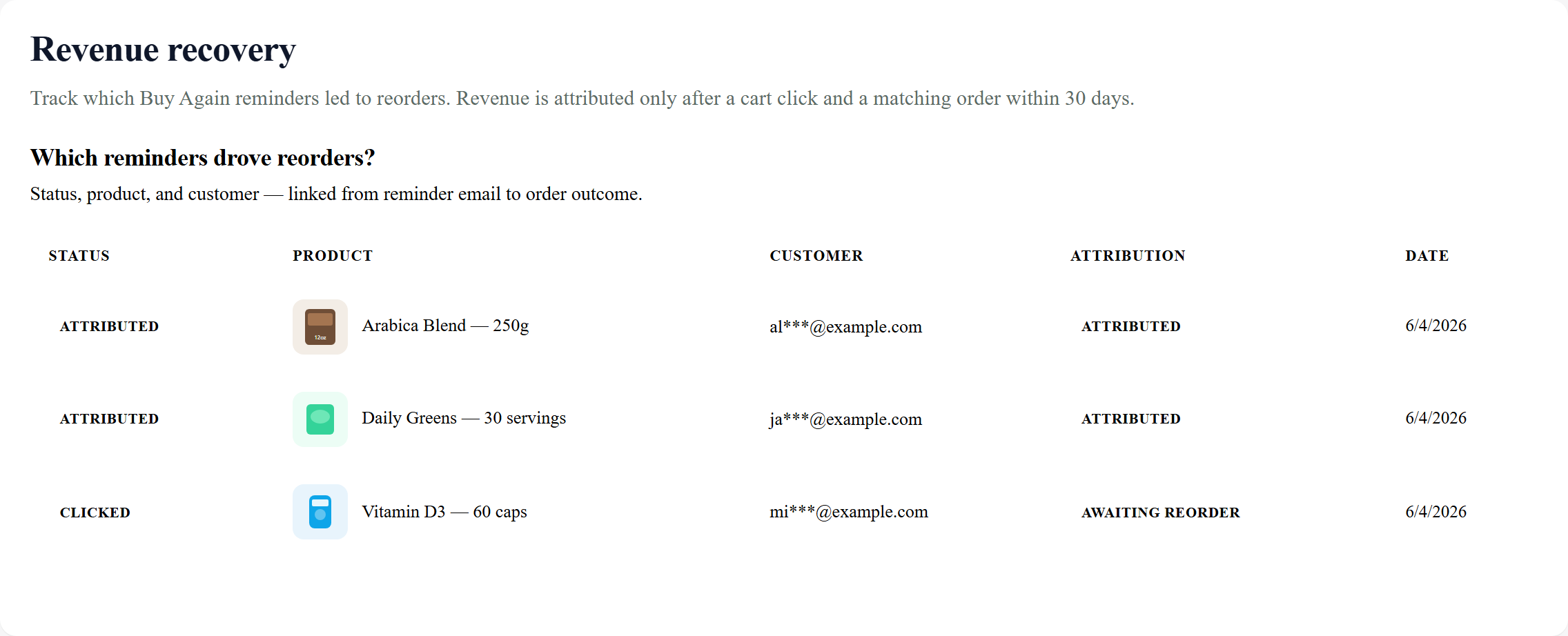
- Reminder rows tied to products and customers
- Revenue after matching reorder
- Buy Again clicks tracked
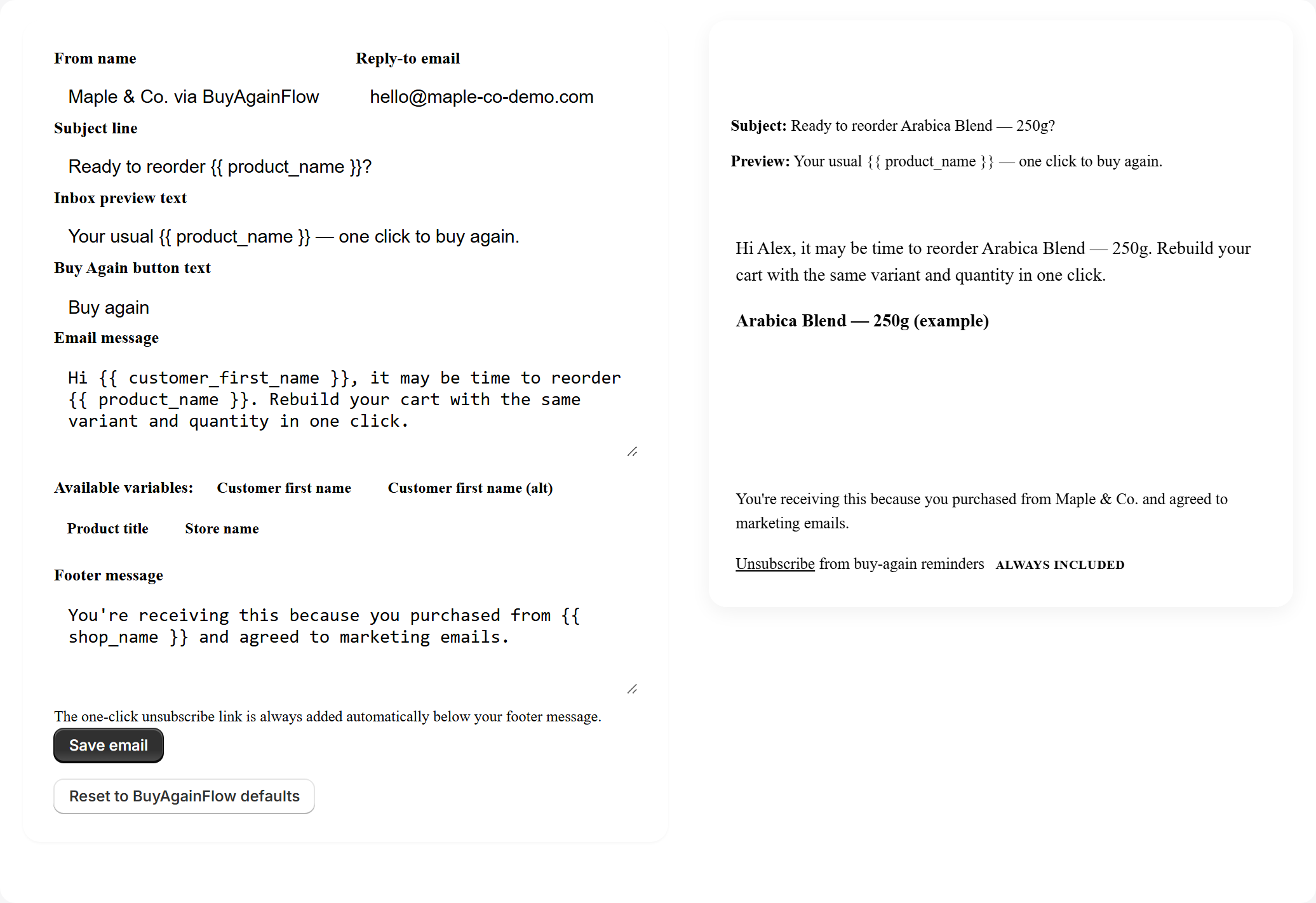
Your message, live customer preview
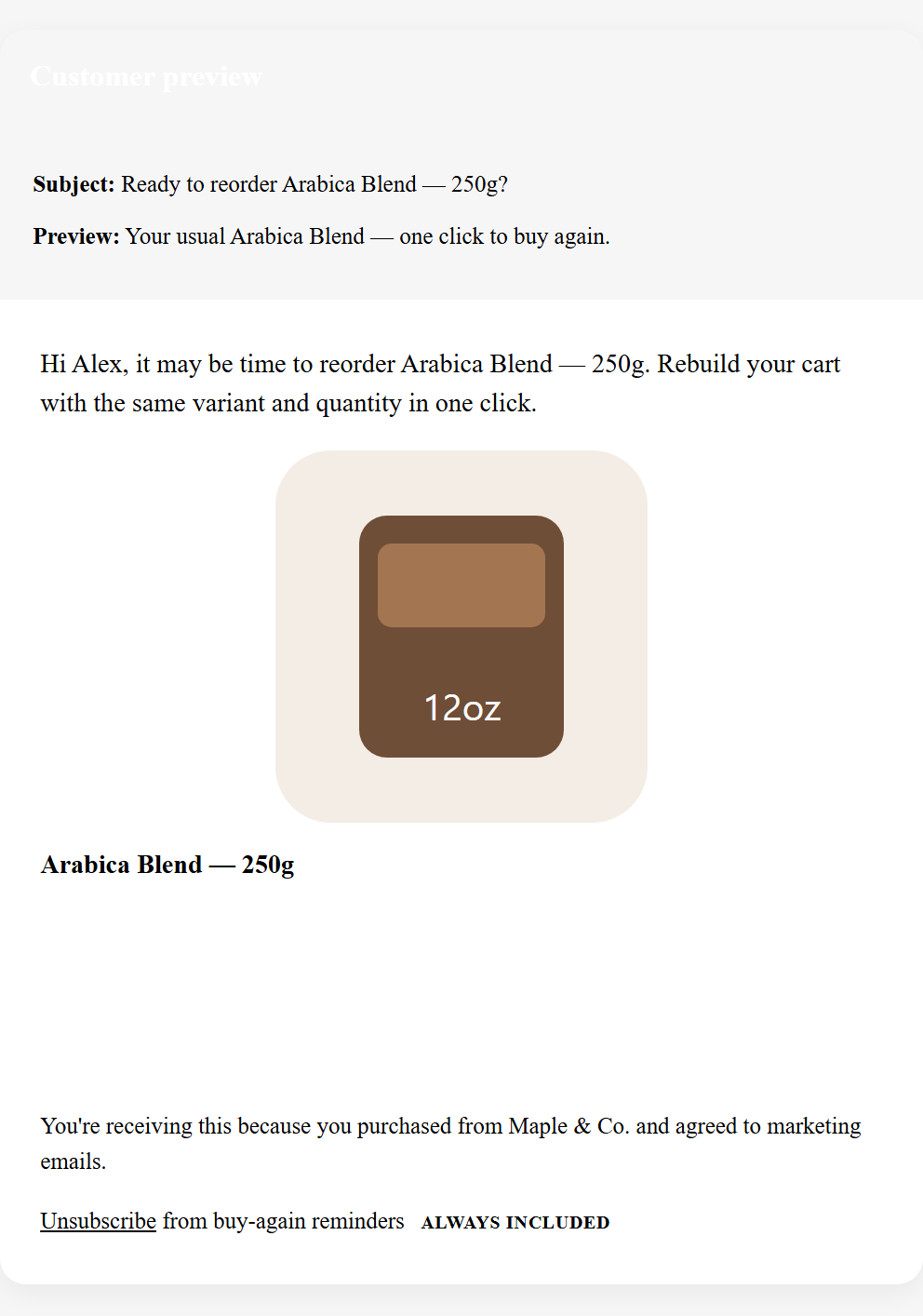
Control subject, preview text, intro, button, and footer. Every reminder rebuilds the same variant and quantity in a pre-filled cart.
- Merchant From name and Reply-To
- Editable subject, intro, and button text
- Unsubscribe footer on every send
- Editor + preview side by side
- Test before live reminders
Send a test Buy Again email to yourself — same template as live reminders, excluded from usage limits.
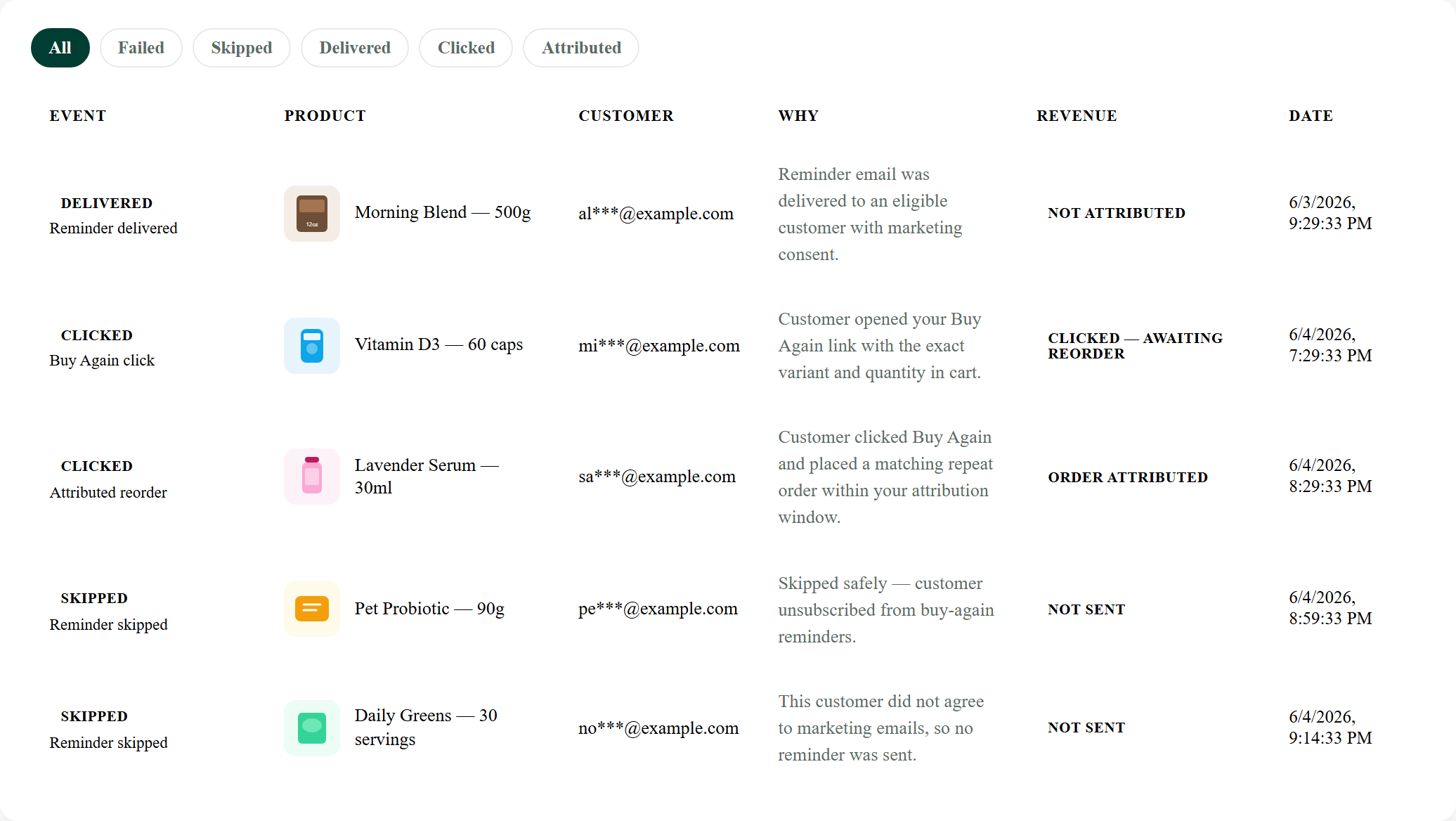
Every reminder has an outcome
Skipped reminders always show why. Sent, clicked, attributed, and failed events stay visible.
- Sent, clicked, and attributed events
- Skipped with readable reasons
- Failed delivery reasons for troubleshooting
- Skips are visible
- Consent and unsubscribe respected
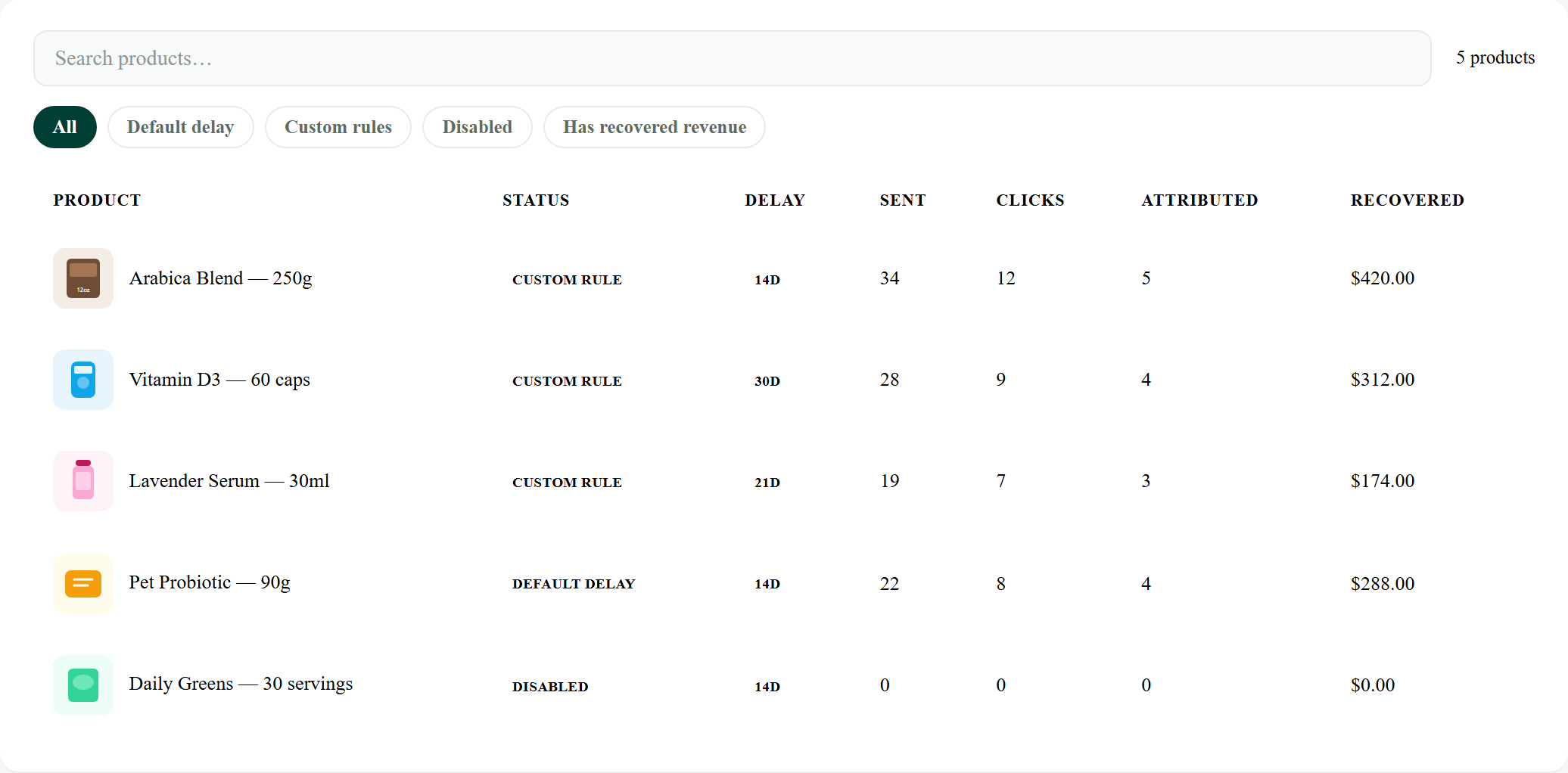
Tune timing per product
Set default reorder delays, override per SKU, and see recovered revenue by product with catalog thumbnails.
- Default and custom delay per product
- Disable reminders for one-off SKUs
- Sends, clicks, and recovered revenue by row
- Coffee, supplements, skincare timing
- Product thumbnails
Built for replenishable products
Works best when customers naturally reorder the same SKU on a predictable cycle.


Not ideal for gift cards, one-off apparel, or luxury single-purchase items.
Why BuyAgainFlow can recover revenue
Most repeat purchases are not new discovery. The customer already bought the product once. BuyAgainFlow brings them back with the same item, same variant, and same quantity in one click.
Lower friction
Customers land in a pre-filled cart instead of searching your catalog again.
Better timing
Reminder timing can match each product's natural refill cycle.
Cleaner attribution
Recovered revenue counts only after a Buy Again click and matching reorder.
Safer sending
Customers without marketing consent or unsubscribed customers are skipped.
Not another generic email campaign tool
BuyAgainFlow is purpose-built for repeat-order recovery, not newsletters, flows, or broad email automation. Works with whatever product and pricing strategy your store already uses.
- Optimize opens and clicks
- Require manual campaign setup
- Often need complex segmentation
- Revenue attribution can stay broad
- Sends Buy Again reminders automatically
- Rebuilds exact cart links
- Tracks click → reorder attribution
- Explains every skipped reminder
Revenue recovery that is transparent and safe
Exact cart links
Same variant and quantity — customers return to a pre-filled cart.
Recovered revenue tracking
Counted only after a Buy Again click and matching reorder.
Consent-safe sending
Opted-in customers only. Unsubscribes enforced before every send.
Product-specific timing
Per-product delays for coffee, skincare, supplements, and more.
Clear audit trail
Every reminder logged — sent, skipped, clicked, failed, or attributed.
Merchant control
Customize copy, timing, and rules. Preview before you go live.
Live in minutes — no code
Install, set reorder timing, send a test, and go live. BuyAgainFlow runs automatically from there.
Install the app
Add BuyAgainFlow from the Shopify App Store. No theme code or developer setup required.
Set reorder timing
Choose a default reminder delay, then override it per product so emails arrive when each item runs out.
Customize and test
Edit the subject, message, and Buy Again button, then send a test email to yourself to preview the exact customer experience.
Go live and track
Reminders send automatically to opted-in customers. Watch recovered revenue, clicks, and outcomes in Activity.
Questions merchants ask
Consent-safe by design, with full visibility into what reminders recover.
Will this spam my customers?
No. Reminders go only to customers who accepted marketing at checkout, and every email includes a one-click unsubscribe that is enforced before each send.
Does it respect marketing opt-in and privacy?
Yes. BuyAgainFlow only emails consented customers, honors unsubscribes, and follows GDPR-compliant data handling.
Does it work with product variants?
Yes. The one-click cart link rebuilds the customer's previous cart with the exact variant and quantity from their original order.
Can I test before going live?
Yes. Send a test Buy Again email to yourself using the same template as live reminders, then go live when it looks right. Test emails do not count toward your plan limit.
Can I see whether it actually works?
Yes. The dashboard shows recovered revenue from reminders that became repeat orders, and Activity logs every send, click, skip, and reorder.
Do I need Klaviyo or complex email flows?
No. BuyAgainFlow is a simpler option for buy-again reminders — install it, set timing, and it runs on its own without building flows.
Simple plans that scale with sends
Start with a 14-day Starter trial, or subscribe to the plan that fits your store.
Trial available once per store. No charge during trial. Test emails do not count toward live reminder limits. Cancel anytime.
14-day trial available once per store.
For low-volume stores testing reminders.
- 100 live reminders/month
- Exact cart links
- Basic revenue dashboard
- Test email
Best for most consumable brands.
- 1,000 live reminders/month
- Revenue attribution
- Product-specific timing
- Delivery audit trail
- Email customization
Best for scaling reorder revenue.
- 5,000 live reminders/month
- Product analytics
- Priority support
- Higher send volume
Best for high-volume stores.
- 20,000 live reminders/month
- Highest send volume
- Deliverability review
- Priority support
Billing through Shopify. 14-day Starter trial available once per store. Cancel anytime.
Recover repeat orders from customers who are ready to buy again
Install in minutes. No theme code required. Start a Starter trial or subscribe when you're ready.